Introduction to LTI 1.3
This guide outlines the steps required to connect your Learning Platform to the TMA Tool using the Learning Tools Interoperability® (LTI) 1.3 standard.
LTI™ 1.3 is a widely used standard for integrating external tools and services into learning management systems and platforms. The documentation for the LTI™ 1.3 standard can be found at IMS Global.
The TMA Tool follows the protocol as described in Chapter 3 of the LTI™ 1.3 documentation. It also supports some additional features from Chapters 4 and 5, such as additional login parameters and course status updates. This document describes both how to implement the connection between your platform and the TMA Tool, as well as other important choices you can make.
For brevity’s sake, we will refer to “the protocol” when mentioning LTI™ 1.3 from now on.
Terminology
To avoid interpretation errors and increase communication effectiveness, we define common terms.
Protocol-Specific Terms
- LTI®: Learning Tool Interoperability, developed by IMS Global, progressing through versions 1.0, 1.1, 1.2, 1.3, and 2.0. The most current and recommended version is 1.3, sometimes referred to as LTI Advanced.
- Platform (Tool Platform/Tool Consumer): The application that allows a platform user to access one or more external applications, delegating functionality to a suite of tools.
- Tool (Tool Provider): An application or service providing specific functionality.
- Tool Deployment: Defines the scope of contexts under which a tool is made available on a platform.
- LTI® Link (Tool Link): A reference to a specific Tool in a Platform, leading to specific resources or content hosted on the Tool.
- LTI® Launch: The process of an end-user interacting with an LTI® Link and being "launched" into a tool, including login initiation, request validation, and tool redirection.
TMA-Specific Terms
- TMS (Talent Management System): A web application that functions as a Tool.
- Candidates: Users of the TMS, engaging with their talents and competencies.
- Users (Customers/Experts): Users who manage candidates. They benefit from TMA’s LTI 1.3 support by reducing manual workload.
- TMA-170 / TMA-312: Assessments taken by candidates upon entering the TMS. The number refers to the number of questions. In LTI 1.3 registration, a TMA-170 is automatically initiated for new candidates.
Candidate Life Cycle
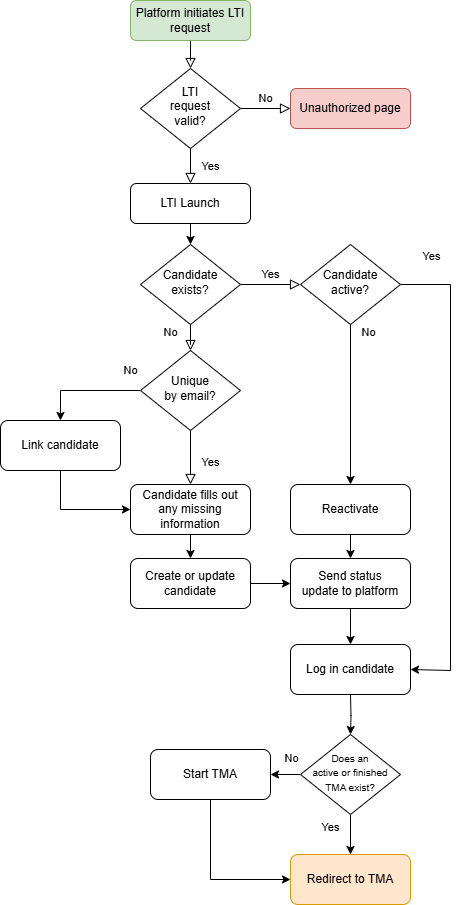
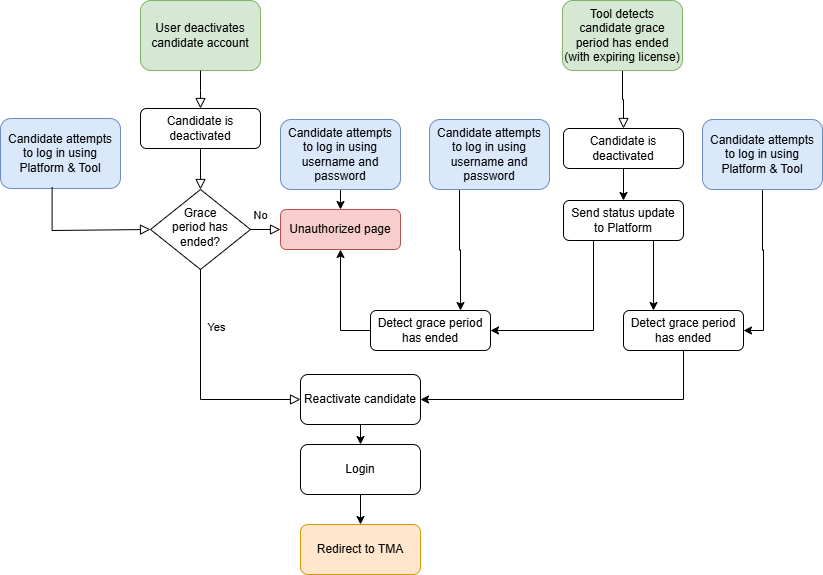
This section provides a visual representation of how TMA processes LTI requests and manages candidate interactions.
Launch flow
State flow
Prerequisites
Before you begin, ensure you have:
- At least one user with TMS administrative privileges to verify the connection.
- A web application supporting LTI 1.3 integration, such as a Learning Management System (LMS).
- A Platform Administrator to configure the settings.
- A list of existing candidates using TMA prior to LTI integration (if applicable) to ensure a smooth migration.